Chat: Difference between revisions
→Chat colors: Reworded and added 'Main color' template. |
|||
| Line 47: | Line 47: | ||
=== Chat colors === | === Chat colors === | ||
By default, the color of a user's chat username is set to their canvas color. If their canvas color is pure black (#000000), their chat color is selected randomly from a list of 11 colors: | By default, the color of a user's chat username is set to their canvas color. If their canvas color is pure black (#000000), their chat color is selected randomly from a list of 11 colors: {{Main_color|#660066}}{{Main_color|#003366}}{{Main_color|#ff9900}}{{Main_color|#ff0066}}{{Main_color|#003300}}{{Main_color|#ff0000}}{{Main_color|#3a3a3a}}{{Main_color|#006666}}{{Main_color|#3399ff}}{{Main_color|#3333ff}}{{Main_color|#000000}}. They can also customize it separately using the /chatcolor command. | ||
If the user's nickname matches their username (case-insensitive), their username shows up in bold lettering. | |||
As a separate feature, world owners can customize the color of both the chat's border and the messages themselves. However, this is only accessible through the [https://github.com/system2k/NodeWorldOfText source code version of OWoT.][[File:Countrysim owot.png|thumb|It is possible to set the color of chat messages.|none]] | |||
=== Nicknames === | === Nicknames === | ||
tbd | tbd | ||
Revision as of 09:30, 8 November 2025

OWOT worlds have the option of having a simple chat which can be found at the bottom-left of the screen by default. Usually when a user refers to chat, they are referring to the chat found on the main page.
The OWoT chat has two tabs: one for the world the user is currently on and a global chat which can be accessed from anywhere.
Chat culture
Anons
The anons of OWOT chat are infamous for being toxic. A lot of them are just normal users without accounts, but the trolls tend to be louder.
Spam
A variety of spam can be found in chat.
-

-

-
 Messages deleted by FP


Chat bots
Frontpage Chat
Formerly the "primary" chat as it was accessible from the Mainpage. Frontpage chat was removed in 2024.
Global Chat
Accessible on all worlds(except those that disable it), the primary chat after Frontpage Chat was removed.
-
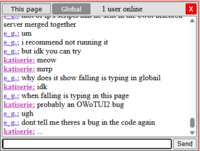 A conversation in Global chat. Only 1 user is online in the world the user is communicating from.
 -
 It is possible for world owners to disable the Global Chat tab while leaving their own world's chat intact.


/...network
Lime.owot's Network project is meant to provide a better moderated, less toxic chat environment that can be accessed from multiple worlds with the use of a script. It was formally publicized in October 2025 as an alternative to the more unpleasant Global Chat. Unlike Global Chat which is only moderated by FP, Network currently has four moderators in lime, Katiserie, e_g., and Falling1.

Goatway
A series of bots that mirror chat messages to Discord, and that allows users to send messages to chat from Discord.
Currently, the most popular Goatway script is hosted in a Discord server by Falling1.
Chat features
Chat commands
Chat colors
By default, the color of a user's chat username is set to their canvas color. If their canvas color is pure black (#000000), their chat color is selected randomly from a list of 11 colors: #660066 #003366 #ff9900 #ff0066 #003300 #ff0000 #3a3a3a #006666 #3399ff #3333ff #000000 . They can also customize it separately using the /chatcolor command.
If the user's nickname matches their username (case-insensitive), their username shows up in bold lettering.
As a separate feature, world owners can customize the color of both the chat's border and the messages themselves. However, this is only accessible through the source code version of OWoT.

Nicknames
tbd
Emojis
There is a limited set of emojis that can be sent in chat.
tbd
Dragging/resizing chat
It is possible to resize the chatbox and drag it around the screen.
-
 Resizable and draggable chatbox

Admin-only features
User tags
Featured in parentheses before the username. Tags can only be given by admins and very few users have received them. The exception to this is in select April Fools events, where all users are allowed to pick their own tags.
The most common tag is the blue (OP) tag, which is held by admins(operators) such as FP.
XSS
tbd

History of chat
Introduction of chat
The OWOT chatbox was introduced in March of 2018 with /changelog/4. At the time chat was intended to merely be a secondary feature, with FP incentivizing people to continue having conversations on the canvas. In the years to come, however, more and more users would come to see chat as the primary form of interface with the community. It eventually got to a point where a significant portion of the userbase(including FP) supported its removal, citing the fact that it distracted too much from the canvas, which is supposed to be the main draw of OWOT.
Updates to chat functionality

Updates included in /changelog/6(December 2018) allowed users to drag the chatbox around their screen, while /changelog/8(March 2020) allowed them to resize it.
In ???, the button for opening chat was changed from its original dark blue color to the transparent grey of most other UI elements. This was met with some amount of backlash from users, though most have since accepted this change.
Removal of Frontpage Chat
On February 16, 2024, FP announced that "after internal discussions", the front page chat would close down from March 10 to March 17 when they would decide either to restore it or keep it disabled. The fate of global chat or chats on other worlds were not elaborated on.
On April 29, it was removed permanently again. Global chat remains; and people also still have the option to use fern's chat enabler, which routes chat messages through /w.
Custom chat designs
Various users have used scripts to change the appearance of chat.
-
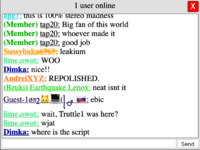
 By Guest-1052
 -
 By Meimei
 -

-
 By fox


Chatrooms populated by OWOT users
Wokecat(created by Sammich) and Sleepycat(created by PinkiePie) are both chatrooms used almost exclusively by (edgier) members of the OWOT community.
They are seen by some as alternatives to OWOT's built in chat system, and of the OWOT Discord, which is hated passionately by most Woke/Sleepycat users.
Wokecat
The idea for Wokecat originated from an YWOT IRC named /~ycentral, which was created in 201? as a way to connect prominent community members outside of the canvas.
The idea of a chatroom for YWOT users has gone through several names over the years, including ycentral, spooks, and awakens.me. Wokecat is the latest version and was created by Sammich in 201?.
Wokecat has a main channel along with several smaller rooms. It enables users to upload gifs, and to customize the color, size and font of their usernames/messages. Certain words are automatically replaced whenever they are sent in chat(Ex. "discord" --> "dicksword," "sammich" --> "1984").
Frequenters of Wokecat include veteran YWOT users Sammich, Mr.Guy(Nihilum), JA and Kevin. Other notable users are Jesse76—who is also active on the YWOT Discord—and Tatejo, who migrated to Wokecat after the sudden closure of Sleepycat. OWOT users such as d9eoead have also been known to visit the site from time to time.
Unlike Sleepycat, Wokecat keeps a permanent log of messages which can be browsed using a search bar. The context behind past messages are still obfuscated, however, as you cannot jump to older convesations like in Discord.
Sleepycat
A Wokecat clone created by Pinkiepie in 201?.
The main difference between the two sites is that Sleepycat does not keep a permanent log of edits, making it a preferable environment for many of OWOT's more toxic users. The chatroom has historically had an antagonistic relationship with the wider OWOT community. On several occasions Sleepycat users have shared plans to take down either OWOT or its Discord server.
Sleepycat mysteriously disappeared in early 2025, causing a few of its users to migrate to Wokecat.
Formerly active users of Sleepycat included PinkiePie, Tatejo, Meimei, Elon, Polonez and many more.