Art scripts: Difference between revisions
m →Mr. Black's brush script: no proof that specific image was from him |
|||
| (24 intermediate revisions by the same user not shown) | |||
| Line 1: | Line 1: | ||
Scripts that | Scripts that help in making [[Art|text art]]. | ||
== | == Brush scripts == | ||
Scripts that let users draw/doodle/paint on the canvas. Most of these scripts were intended for art, but they are often used for [[spam]] instead. | |||
=== /ms-paint === | === /ms-paint === | ||
{{main|Unique_worlds#/ms-paint}}[https://ourworldoftext.com/ms-paint /ms-paint] was | {{main|Unique_worlds#/ms-paint}}[https://ourworldoftext.com/ms-paint /ms-paint] was a world released by [[Poopman]] on October 19th, 2023. | ||
A script was used to replicate Microsoft Paint within OWOT, allowing users to doodle and access a number of drawing tools. [[FP]] later set the script to run by default whenever a user enters the world. | A script was used to replicate Microsoft Paint within OWOT, allowing users to doodle and access a number of drawing tools. [[FP]] later set the script to run by default whenever a user enters the world. | ||
| Line 12: | Line 12: | ||
=== Line Draw === | === Line Draw === | ||
Also by Poopman. The script is accessible from the scroll emoji on the [[Center Console]]. | |||
== CCL Paint == | This is a more primitive drawing script that automatically spawns unicode lines (─│┐└└┘┘) whenever you move your cursor. | ||
=== Guest 1052's paint script === | |||
This script is not available to the public.[[File:1052 was here.png|center|thumb]] | |||
=== CCL Paint === | |||
{{main|Crazy_Cat_Lady#Spherical_Brush_Script(a.k.a._CCL_Paint)}}Created by [[Crazy Cat Lady]] in early 2025. It is a fairly complex script that comes with its own UI (which also changes the appearance of [[chat]]) and allows users to draw with full blocks, [[Octant|octants]], and cell background colors. | {{main|Crazy_Cat_Lady#Spherical_Brush_Script(a.k.a._CCL_Paint)}}Created by [[Crazy Cat Lady]] in early 2025. It is a fairly complex script that comes with its own UI (which also changes the appearance of [[chat]]) and allows users to draw with full blocks, [[Octant|octants]], and cell background colors. | ||
| Line 22: | Line 27: | ||
</gallery> | </gallery> | ||
== Blobby Paint == | === Prohibit's paint script === | ||
Created by [[🚫]](a.k.a. [[🚫|Prohibit]]) in late 2025. It does not seem to support colors and creates very thin lines using octants. | |||
This script is not available to the public.[[File:Prohibit void december 25 2025.png|center|thumb|"The Void," a creature drawn using Prohibit's script]] | |||
=== Blobby Paint === | |||
{{main|Banksy#Blobby_Paint}}Created by [[Banksy]] in January 2026. Blobby Paint is unique in that it creates lines by chaining together octant circles of various sizes. A later update also added a number of high quality brush styles. | {{main|Banksy#Blobby_Paint}}Created by [[Banksy]] in January 2026. Blobby Paint is unique in that it creates lines by chaining together octant circles of various sizes. A later update also added a number of high quality brush styles. | ||
This script is not available to the public.[[File:Blobby paint color.png|center|thumb|First colored tests on January 6th, 2026]] | This script is not available to the public.[[File:Blobby paint color.png|center|thumb|First colored tests on January 6th, 2026]] | ||
== | === Yoo's paint script === | ||
[[File: | Stacks different lines of characters next to one another in order to make them look 3D. | ||
== As a form of spam == | [[File:Yoclub february 21 2026.png|center|thumb|327x327px|February 21st, 2026]] | ||
=== Mr. Black's brush script === | |||
{{main|Mr. Black#Brush script}} | |||
Contains an eraser, a fill tool, and a variety of brush styles.<gallery mode="packed" heights="200"> | |||
File:Mr black ms paint 8.gif|Mirroring. (Sped up 10x) | |||
File:Mr black ms paint 10.gif|Fill tool. (Sped up 10x) | |||
File:Mr black ms paint 15.gif|Changing the colors of pre-existing text. (Sped up 2x) | |||
</gallery> | |||
=== As a form of spam === | |||
{{main|Spam}} | {{main|Spam}} | ||
[[File:Pkk_scribble_spam_2.png|center|thumb|Several types of scribble spam on August 24th, 2025, most likely from [[PKK spammer|PKK]]]] | [[File:Pkk_scribble_spam_2.png|center|thumb|Several types of scribble spam on August 24th, 2025, most likely from [[PKK spammer|PKK]]]] | ||
== Symbol shortcuts == | |||
Scripts that allow you to select a symbol without having to copy and paste it. This saves a lot of time as most [[Symbols for Legacy Computing|SLC]]/unicode art requires the artist to constantly switch between a variety of characters. Certain scripts also make it easier to select text and cell colors. | |||
=== Center Console === | |||
Clicking the yellow rectangle/cursor on the bottom left corner of the [[Center Console]] activates a script that replaces numbers 1 through 9 on your keyboard with the following symbols: | |||
█ ▓ ▒ ░ ▀ ▄ ▌ ▐ ■ | |||
=== Yosicat === | |||
A keyboard with shortcuts to SLC slopes. | |||
[[File:Yosicat_slc_keyboard.png|center|thumb|299x299px|Yosicat planning his SLC keyboard]] | |||
=== /octf === | |||
[https://ourworldoftext.com/octf /octf] is a world created by [[Kaz]] in October 2026. It allows users to select specific [[octant]] symbols from the 256 characters set. | |||
=== Banksy === | |||
Created in January 2026 when Banksy started to make more complex SLC art. The script allows him to cycle through sets of SLC using his keyboard, it is not available to the public.<gallery mode="packed" heights="200" caption="Script for making SLC art"> | |||
File:Banksy_art_script.png | |||
File:Banksy_art_script_2.gif|Sped up 8x | |||
</gallery> | |||
=== 67x8 === | |||
Released by [[67x8]] on January 18th, 2026. | |||
It creates a menu at the bottom of the screen from which users can select a variety of common drawing symbols. The UI is designed to be mobile-compatible, allowing users to make SLC/unicode art on their phones (where copying and pasting is excruciatingly tedious). | |||
The script was initially unable to render SLC in its menu, though this was fixed in an update on January 20th. | |||
[[File:67x8 symbol selector.gif|center|thumb|Linked on [https://ourworldoftext.com/banksy /Banksy]]] | |||
==== Banksy mod ==== | |||
67x8's script with alterations by Banksy. Released on January 19th, 2026. | |||
The new UI allows users to change their cell colors and copy colors from the canvas. The last five color/cell color combinations copied can be selected from the bottom left corner. | |||
This script (along with its predecessor) is available on [https://ourworldoftext.com/banksy /Banksy].<gallery mode="packed" heights="200"> | |||
File:67x8 symbol selector banksy mod.png | |||
File:67x8 symbol selector banksy mod controls.png|alt=Controls vs. Banksy's old SLC script | |||
</gallery> | |||
[[Category:Scripts]] | [[Category:Scripts]] | ||
[[Category:Art]] | [[Category:Art]] | ||
[[Category:Compilation pages]] | [[Category:Compilation pages]] | ||
Latest revision as of 01:14, 5 March 2026
Scripts that help in making text art.
Brush scripts
Scripts that let users draw/doodle/paint on the canvas. Most of these scripts were intended for art, but they are often used for spam instead.
/ms-paint
/ms-paint was a world released by Poopman on October 19th, 2023.
A script was used to replicate Microsoft Paint within OWOT, allowing users to doodle and access a number of drawing tools. FP later set the script to run by default whenever a user enters the world.
Users can make art on the page and then use ctrl/alt+a to copy it elsewhere, or access a similar drawing script from Guest-1052's /scriptcatalog.

Line Draw
Also by Poopman. The script is accessible from the scroll emoji on the Center Console.
This is a more primitive drawing script that automatically spawns unicode lines (─│┐└└┘┘) whenever you move your cursor.
Guest 1052's paint script
This script is not available to the public.

CCL Paint
Created by Crazy Cat Lady in early 2025. It is a fairly complex script that comes with its own UI (which also changes the appearance of chat) and allows users to draw with full blocks, octants, and cell background colors. CCL had planned to release this script to the public but was not able to finish it before leaving to study abroad in mid 2025.
-
 CCL testing her paint script
 -
 Timelapse of CCL drawing at Spawn


Prohibit's paint script
Created by 🚫(a.k.a. Prohibit) in late 2025. It does not seem to support colors and creates very thin lines using octants.
This script is not available to the public.

Blobby Paint
Created by Banksy in January 2026. Blobby Paint is unique in that it creates lines by chaining together octant circles of various sizes. A later update also added a number of high quality brush styles. This script is not available to the public.

Yoo's paint script
Stacks different lines of characters next to one another in order to make them look 3D.

Mr. Black's brush script
Contains an eraser, a fill tool, and a variety of brush styles.
-
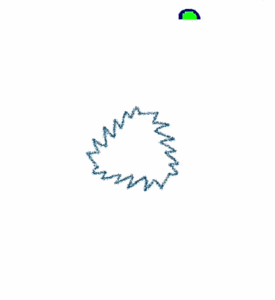 Mirroring. (Sped up 10x)
 -
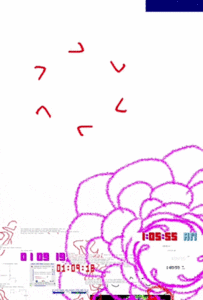 Fill tool. (Sped up 10x)
 -
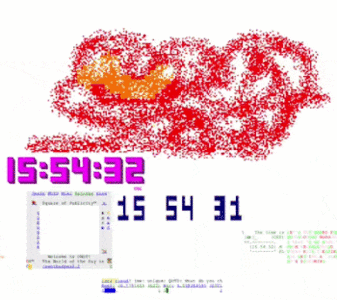 Changing the colors of pre-existing text. (Sped up 2x)


As a form of spam

Symbol shortcuts
Scripts that allow you to select a symbol without having to copy and paste it. This saves a lot of time as most SLC/unicode art requires the artist to constantly switch between a variety of characters. Certain scripts also make it easier to select text and cell colors.
Center Console
Clicking the yellow rectangle/cursor on the bottom left corner of the Center Console activates a script that replaces numbers 1 through 9 on your keyboard with the following symbols:
█ ▓ ▒ ░ ▀ ▄ ▌ ▐ ■
Yosicat
A keyboard with shortcuts to SLC slopes.

/octf
/octf is a world created by Kaz in October 2026. It allows users to select specific octant symbols from the 256 characters set.
Banksy
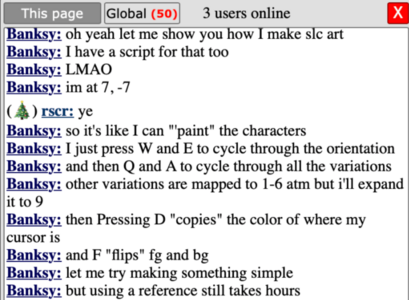
Created in January 2026 when Banksy started to make more complex SLC art. The script allows him to cycle through sets of SLC using his keyboard, it is not available to the public.
- Script for making SLC art
-
-
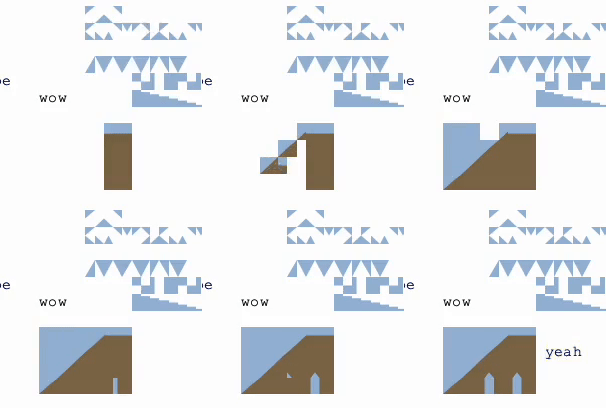 Sped up 8x


67x8
Released by 67x8 on January 18th, 2026.
It creates a menu at the bottom of the screen from which users can select a variety of common drawing symbols. The UI is designed to be mobile-compatible, allowing users to make SLC/unicode art on their phones (where copying and pasting is excruciatingly tedious).
The script was initially unable to render SLC in its menu, though this was fixed in an update on January 20th.

Banksy mod
67x8's script with alterations by Banksy. Released on January 19th, 2026.
The new UI allows users to change their cell colors and copy colors from the canvas. The last five color/cell color combinations copied can be selected from the bottom left corner.
This script (along with its predecessor) is available on /Banksy.

