Art: Difference between revisions
No edit summary |
|||
| Line 13: | Line 13: | ||
== Traditional ASCII Art == | == Traditional ASCII Art == | ||
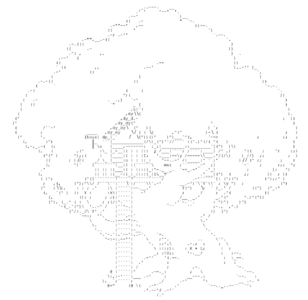
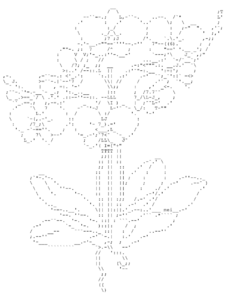
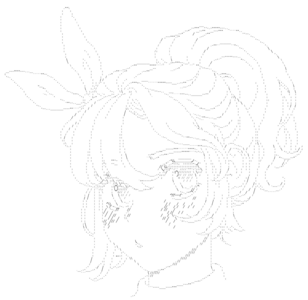
Art made almost entirely of standard keyboard characters, with the occasional unicode thrown in.<gallery mode="packed" heights="200" caption="Art by [[Meimei]]"> | |||
File:Meimei tree.png | |||
File:Meimei flowers.png | |||
File:Meimei big face.png | |||
</gallery> | |||
=== Tutorial === | === Tutorial === | ||
Once you get the hang of it, it is possible to replicate line art using text characters. | |||
<u>To adjust steepness of horizontal lines:</u> | |||
`. `-_ `-.._ `*-..__ etc. | |||
<u>To adjust steepness of vertical lines:</u> | |||
: : : | |||
: : : | |||
: L ' | |||
: : : | |||
: q ' | |||
: : q | |||
\ \ \ | |||
: : : | |||
: : : | |||
: J ' | |||
: : : | |||
: y ' | |||
: : y | |||
/ / / | |||
<u>To Shade:</u> | |||
III;;;;;:::::.'.'.'`.`.`.``` | |||
IIIIII;;;;;;:::::.'.'.'`.`.`.```` | |||
HHHHIIII;;;;;::::::.'.'.'.`.`.`.```` | |||
IIIIII;;;;;;:::::.'.'.'`.`.`.````` | |||
III;;;;;:::::.'.'.'`.`.`.``` | |||
=== Colored ASCII Art === | === Colored ASCII Art === | ||
[[File:9029 1.png|thumb|378x378px|Colored art by [[9029]]]] | |||
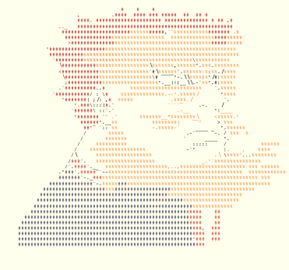
<gallery mode="packed" widths="200" heights="180" caption="Colored Art from [[Manhatingzone|/mhz]]"> | |||
File:Mhz color 1.png | |||
File:Mhz color 2.png | |||
</gallery> | |||
== ANSI/PETSCII Art == | == ANSI/PETSCII Art == | ||
| Line 22: | Line 62: | ||
=== Tutorial === | === Tutorial === | ||
=== | === Pixel Art === | ||
Users like [[CCL]] and [[Poopman]] have developed scripts that allow users to draw pixel art using unicodes and SLC characters. | Users like [[CCL]] and [[Poopman]] have developed scripts that allow users to draw pixel art using unicodes and SLC characters.<gallery mode="packed" heights="200"> | ||
[[File:Ccl cyberpunk.png| | File:9029 2.png|Pixel art by [[9029]] | ||
File:Ccl cyberpunk.png|Pixel art by [[CCL]] | |||
</gallery> | |||
== SLC Art == | == SLC Art == | ||
'''''<u><small>*See [[Symbols for Legacy Computing]].</small></u>'''''[[File:dante.jpeg|thumb|Slc art on /main]] | |||
[[File:dante.jpeg|thumb|Slc art on /main]] | |||
[[File:3dfp.jpeg|thumb|3D Fp text slc art using bgcolors|center]] | [[File:3dfp.jpeg|thumb|3D Fp text slc art using bgcolors|center]] | ||
[[Category:Artists]] | [[Category:Artists]] | ||
Revision as of 11:51, 27 May 2025

Art is the opposite of spam; content intended to make OWOT feel more chill and less spammed. It's often griefed, replaced, spammed or wiped, often by trolls and griefers.
It's hard to find at spawn, but can be found more far away. However, there are times where art is seen at spawn, for example on January 29 2023.
Art can mainly be found on /main or other worlds.
Art archives like KKosty4ka's art archive, fp's art archive and /SpawnHistory/2023(im a member on this one) exist.
Art is also ruined by spam scripts or overwritten by image pasters.
There are many types of text art like SLC Art, ANSI art and ASCII Art.
Traditional ASCII Art
Art made almost entirely of standard keyboard characters, with the occasional unicode thrown in.
- Art by Meimei
-
-
-


Tutorial
Once you get the hang of it, it is possible to replicate line art using text characters.
To adjust steepness of horizontal lines:

`. `-_ `-.._ `*-..__ etc.

To adjust steepness of vertical lines:

:     :     :
:     :     :
:     L     '
 :     :     :
 :     q     '
  :     :     q
   \     \     \

   :     :     :
   :     :     :
   :     J     '
  :     :     :
  :     y     '
 :     :     y
/     /     /

To Shade:

III;;;;;:::::.'.'.'`.`.`.```
IIIIII;;;;;;:::::.'.'.'`.`.`.````
HHHHIIII;;;;;::::::.'.'.'.`.`.`.````
IIIIII;;;;;;:::::.'.'.'`.`.`.`````
III;;;;;:::::.'.'.'`.`.`.```
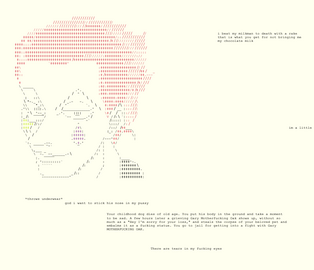
Colored ASCII Art

- Colored Art from /mhz
-
-


ANSI/PETSCII Art
Tutorial
Pixel Art
Users like CCL and Poopman have developed scripts that allow users to draw pixel art using unicodes and SLC characters.


SLC Art
*See Symbols for Legacy Computing.

